Automating Passive Recon: Using n8n to Build an OSINT Pipeline
Why n8n for OSINT?
Most recon tools are single-purpose. subfinder finds subdomains. dnsx resolves them. httpx probes for HTTP metadata. We stitch them together with Bash scripts, pipe outputs into files, post-process with jq, and eventually end up with something readable. It works, but every step is manual, every run is slightly different, and sharing results with our team means manually sending a text file over Slack.
n8n changes that equation. It’s an open-source, self-hosted workflow automation tool. Each step in a recon process becomes a visible node on a canvas. Data flows between nodes as JSON. We can branch, merge, loop, and transform data using JavaScript/python inside Code nodes. And when we’re done, we can trigger the whole thing from anywhere, a webhook, a Slack command, a schedule, or a button click.
What We’re Building
Here’s the big picture of what this workflow does:
- Someone sends a domain name to a Slack channel.
- The workflow receives that domain via a webhook.
- Five different data sources are queried simultaneously.
- Each source’s response is parsed and normalized into a common format.
- All the normalized data is merged and deduplicated.
- A structured Markdown report is generated.
- The report is posted back to the same Slack channel.
The data sources cover:
- DNS records (A, MX, NS, TXT, SOA, CNAME) from two providers
- Subdomain enumeration from passive DNS databases
- Certificate Transparency logs from two different CT search APIs
- IP metadata including ASN, country, cloud provider, and reverse DNS
- HTTP fingerprinting page titles, server headers, detected technologies
- SSH banners where exposed
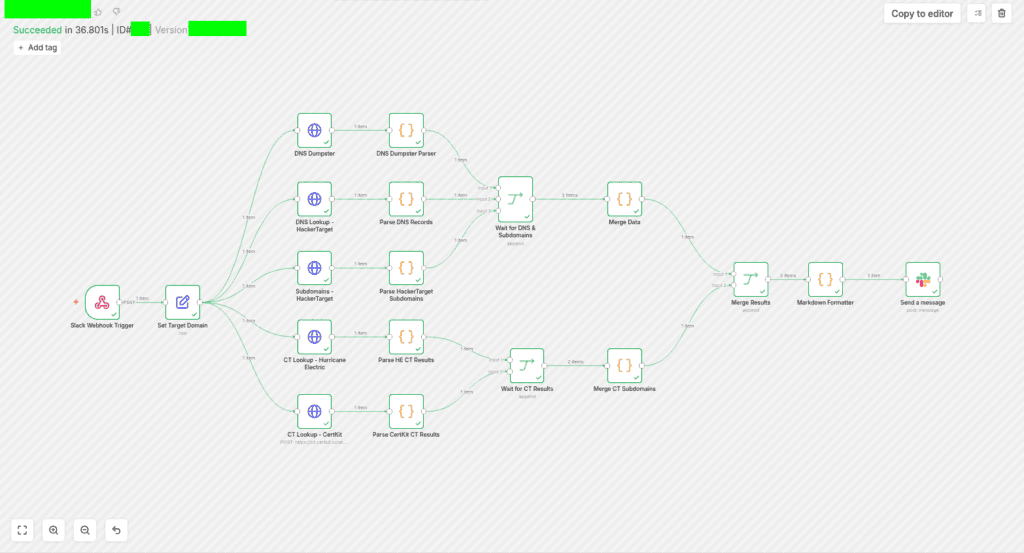
Below is the n8n workflow for DOMAIN OSINT which we will be using for the purposes of this blog.
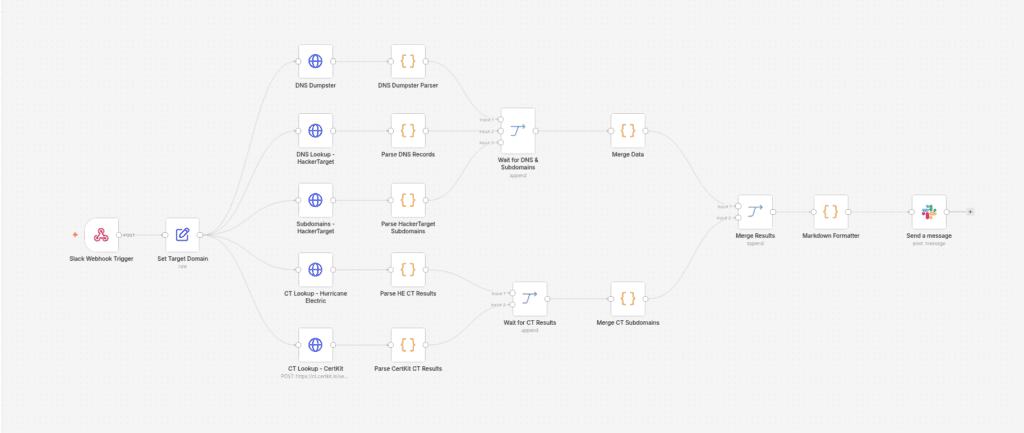
From the above image, we can see that it contains multiple different resources and nodes. In order to understand the internals, let’s walk through the whole thing and how it works under the hood.
The Data Sources
Before looking at how the workflow is wired, it will be critical to understand what each API gives us and why we used it here.
HackerTarget
HackerTarget offers a free tier that exposes two endpoints relevant to recon:
- /dnslookup/ : Returns the DNS records for a domain: A, MX, NS, TXT, SOA, and CNAME records.
- /hostsearch/ : Returns known subdomains from HackerTarget’s passive DNS database, along with the IP addresses they resolve to.
Both endpoints are unauthenticated on the free tier with rate limiting.
DNSDumpster
DNSDumpster is a more comprehensive recon tool that also has an API. It returns structured JSON that includes everything HackerTarget does, but adds richer IP metadata: ASN numbers, ASN names, country codes, PTR (reverse DNS) records, HTTP banner grabs (titles and server headers), detected web technologies, and even SSH banners. DNSDumpster API requires an authentication header, which is handled through n8n’s credential system.
Certificate Transparency Logs: Hurricane Electric and CertKit
When a certificate is issued for a domain, it gets logged in public Certificate Transparency (CT) logs. Anyone can query these logs. This is one of the most powerful passive recon techniques because:
- Certificates are issued for domains before they go live. We can find infrastructure before it’s publicly accessible.
- Wildcard certs (*.example.com) tell us the organization uses a wildcard strategy, but individual certs reveal specific subdomains the organization is using.
- Internal tooling, staging environments, and forgotten infrastructure often have certs.
- We can find subdomains that have never appeared in any DNS scan.
The workflow queries two CT search APIs:
- Hurricane Electric (bgp.he.net): Returns a list of unique domains with their certificate counts.
- CertKit (ct.certkit.io): Returns individual certificate records with their DNS names, including wildcard flags.
Triggering the Workflow from Slack
The entry point is a Slack Webhook Trigger node. In n8n, we can expose a webhook URL that listens for incoming POST requests. When Slack’s outgoing webhook (or a Slack App configured for slash commands) sends a POST to that URL, the workflow is executed.
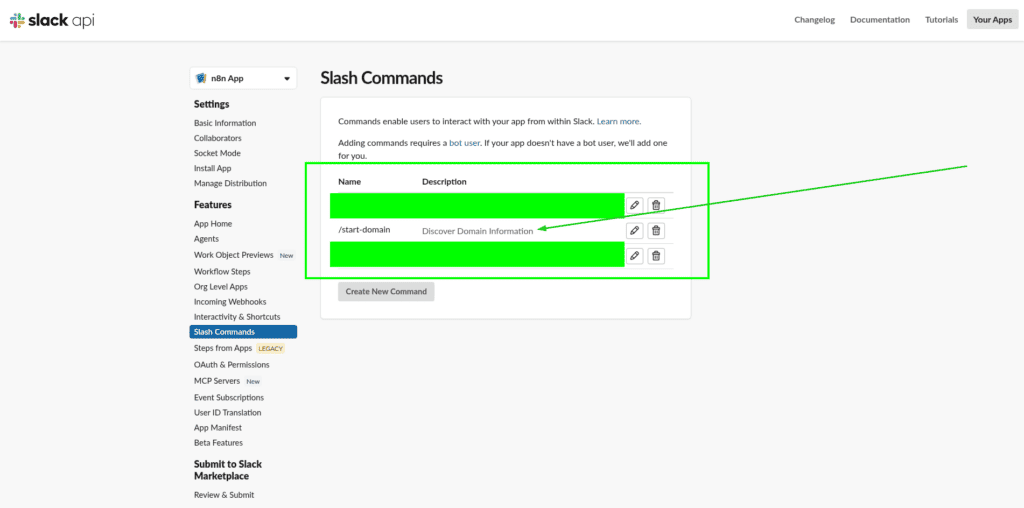
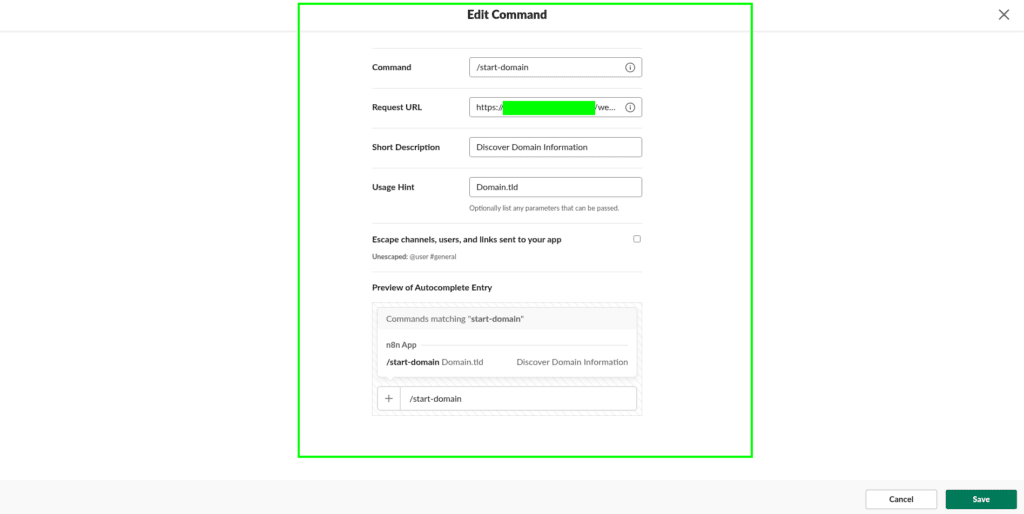
The raw Slack payload arrives as JSON. The domain name lives inside body.text, whatever the user typed. The first thing the workflow does is extract that value and store it cleanly:
{ “domain”: “example.com” }
This is handled by a Set node called “Set Target Domain”. From this point on, every downstream node references {{ $json.domain }} to get the target.
Collecting the Data in Parallel
After the domain is set, the workflow fans out to five parallel HTTP request nodes simultaneously as shown below.
Set Target Domain
├──→ DNS Lookup – HackerTarget
├──→ Subdomains – HackerTarget
├──→ CT Lookup – Hurricane Electric
├──→ CT Lookup – CertKit
└──→ DNS Dumpster
Now talking about a sequential Bash script, we would hit each API one at a time and wait for each response before moving on. Running five requests in parallel here means the total time is roughly the duration of the slowest single request, not the sum of all five. On a typical n8n run, all five return within two to three seconds.
Parsing Each Source into a Common Shape
Raw API responses are messy and inconsistent. HackerTarget returns plain text. DNSDumpster returns deeply nested JSON. Hurricane Electric returns one structure, CertKit returns another. Before we can merge anything, we need to normalize everything into the same shape.
This is where the Code nodes come in. Each data source has its own dedicated parser that transforms the raw response into a consistent format. The workflow uses what we might call a “canonical schema”, every parser outputs data in the same shape regardless of where it came from.
The Canonical Asset Schema
Every discovered host gets represented as an asset object:
{
“hostname”: “mail.example.com”,
“wildcard”: false,
“ips”: [
{
“address”: “10.10.10.10”,
“asn”: “15133”,
“asnName”: “Edgecast”,
“country”: “United States”,
“countryCode”: “US”,
“provider”: “Edgecast”,
“ptr”: “10.10.10.10.in-addr.arpa”
}
],
“http”: {
“title”: “Example Domain”,
“server”: “nginx”,
“technologies”: [“Nginx”, “Bootstrap”]
},
“ssh”: {
“banner”: null
},
“sources”: [“DNSDumpster”, “HackerTarget”]
}
The Canonical DNS Schema
DNS records all use the same shape:
{
“type”: “MX”,
“name”: “@”,
“value”: “mail.example.com”
}
Parser 101
- Parse DNS Records (HackerTarget): HackerTarget’s DNS response is plaintext with lines like A : 10.10.10.10. The parser splits each line, identifies the record type, and builds the canonical DNS list.
- Parse HackerTarget Subdomains: The CSV response (hostname,ip) is split by line and comma. Each row becomes an asset object with a minimal IP entry.
- DNS Dumpster Parser: DNSDumpster’s JSON response has nested structures for A records, MX records, NS records, TXT records, and HTTP/SSH banners. The parser walks through each section, building both the assets array and the dns records array.
- Parse HE CT Results: Hurricane Electric returns a list of domain objects. The parser deduplicates them using a JavaScript Map (keyed on hostname) and marks wildcard entries.
- Parse CertKit CT Results: CertKit returns certificate objects, each with a dnsNames array (one cert can cover multiple hostnames). The parser explodes each cert into individual hostname entries, tracking which ones are wildcards.
[ Note: The two CT parsers output a slightly different structure: They don’t have IP data, just hostnames and source attribution. ]
Merging Data
Merging is the most logic-heavy part of this workflow. We have five sources of data, with significant overlap. The same subdomain might appear in HackerTarget, DNSDumpster, and both CT searches. We want one clean record per hostname, with all the available data combined.
Two Merge Streams
The workflow runs two separate merge pipelines:
Stream 1: DNS + Subdomains + DNSDumpster
A 3-input Merge node (“Wait for DNS & Subdomains”) collects the outputs from:
- DNS Dumpster Parser (input 0)
- Parse DNS Records (input 1)
- Parse HackerTarget Subdomains (input 2)
Once all three arrive, they flow into the Merge Data Code node. This is the main infrastructure merge.
Stream 2: CT Logs
A 2-input Merge node (“Wait for CT Results”) collects the outputs from both CT parsers. Once both arrive, they flow into Merge CT Subdomains.
Merge CT Subdomains produces CT-only asset objects, hostnames discovered through certificate logs, with no IP data (yet). These get a flag in their sources list to distinguish them from assets discovered through DNS.
Both streams then feed into a final Merge Results node, which combines the infrastructure-rich data from Stream 1 with the CT-discovered hostnames from Stream 2.
The Merge Logic
The infrastructure merge code uses a JavaScript Map (keyed on lowercase hostname). When the same hostname appears in multiple sources, the merge logic combines the data rather than overwriting it:
- Wildcard flag: If any source says it’s a wildcard, the merged record is marked wildcard.
- Sources list: All sources are combined into a deduplicated, sorted array. A record seen by both HackerTarget and DNSDumpster will show [“DNSDumpster”, “HackerTarget”].
- IP addresses: IPs are merged by address. If HackerTarget found the same IP but without ASN data, and DNSDumpster found it with ASN data, the merged IP record gets the ASN.
- Technologies: All detected technology strings are deduplicated and sorted.
Likewise the DNS records use the same deduplication pattern, a Set (keyed on type|name|value) prevents duplicates across sources.
The final output from all the merging is a single clean JSON object:
{
“target”: {
“timestamp”: “2026-07-01T12:34:56.000Z”
},
“statistics”: {
“assets”: 47,
“uniqueIPs”: 31,
“uniqueASNs”: 8,
“countries”: 4,
“technologies”: 12,
“dnsRecords”: 23,
“sources”: [“CertKit”, “DNSDumpster”, “HackerTarget”, “HurricaneElectric”]
},
“assets”: […],
“dns”: {…}
}
Report Generation
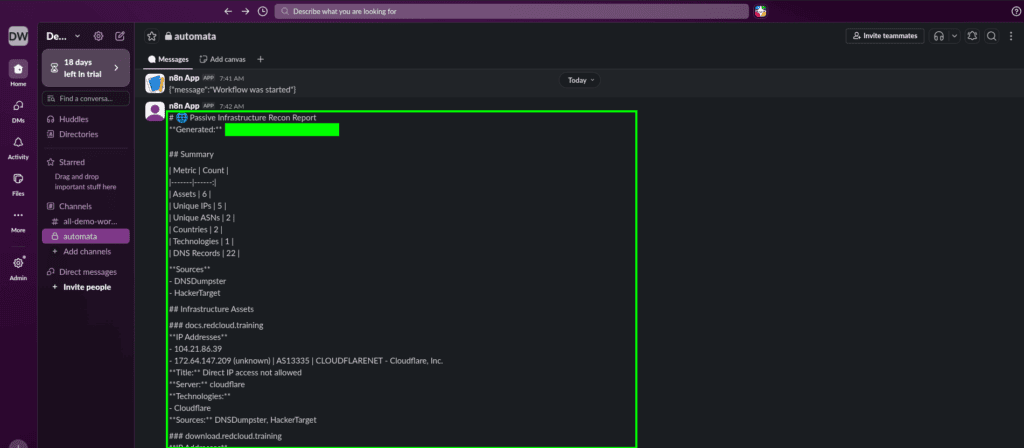
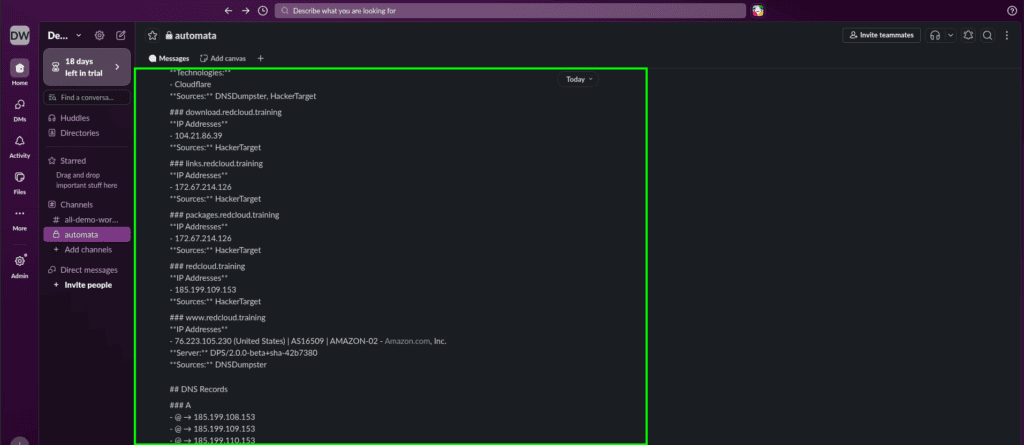
The final Code node i.e., Markdown Formatter, takes the merged JSON and converts it into a human-readable Markdown document. Below is a list of content which gets included:
- Summary Table
- Infrastructure Assets
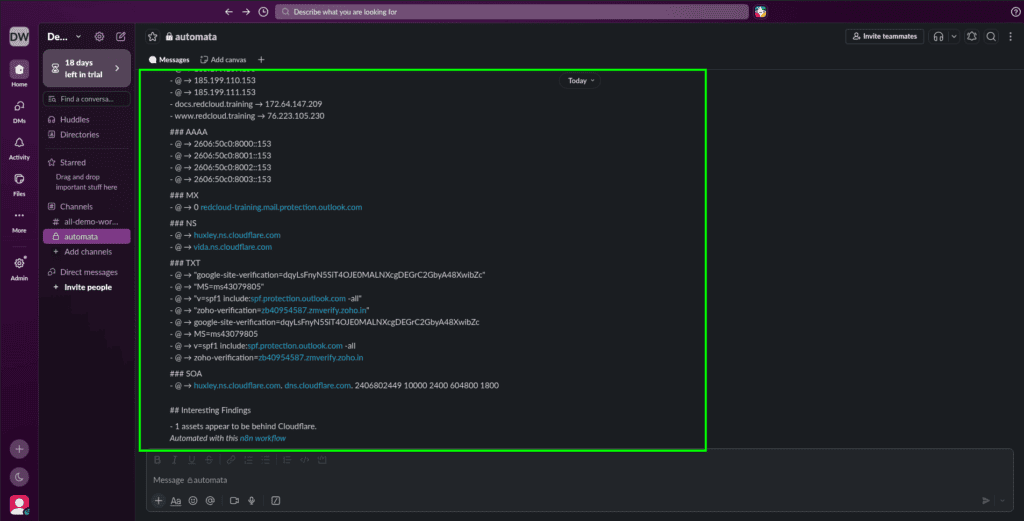
- DNS Records
- Interesting Findings
This Markdown output is posted directly to the Slack channel by the final Send a message node, using n8n’s Slack integration with the channel ID hardcoded in the configuration.
Setting This Up Ourself
1. Run n8n
The fastest way is Docker. Run below commands to spin up an n8n container and then simply navigate to http://localhost:5678 and create a new account.
docker volume create n8n_data
docker run -it –rm \
–name n8n \
-p 5678:5678 \
-e GENERIC_TIMEZONE=”<YOUR_TIMEZONE>” \
-e TZ=”<YOUR_TIMEZONE>” \
-e N8N_ENFORCE_SETTINGS_FILE_PERMISSIONS=true \
-e N8N_RUNNERS_ENABLED=true \
-v n8n_data:/home/node/.n8n \
docker.n8n.io/n8nio/n8n
[ Note: Ideally for the persistent setup, a better way is to use Docker Compose with a PostgreSQL or SQLite backing store. ]
2. Import the Workflow
In the n8n editor, go to Workflows → Import from File and paste in the workflow JSON. All nodes will appear on the canvas. Download the workflow file from HERE.
3. Set Up Credentials
Two credentials are needed:-
- Slack credential:
- Create a Slack App
- Add a bot token with chat:write scope
- Configure it in n8n under Credentials.
- DNSDumpster API key:
- Sign up at dnsdumpster.com and get the API key
- Add it as an HTTP Header Auth credential named something like “Header Auth account.”
- Set the header name to X-API-Key.
[ Note: HackerTarget, Hurricane Electric, and CertKit are all used unauthenticated in this workflow. ]
4. Configure the Slack Webhook
The Slack Webhook Trigger node generates a URL when we activate the workflow. Configure a slash command (e.g: /recon-domain) in the Slack Admin dashboard with the URL pointing to the Webhook from n8n.
5. Set the Output Channel
In the Send a message node, update the CHANNEL_ID to the ID of the Slack channel we want the report posted to. we can find a channel’s ID by right-clicking it in Slack.
6. Activate the Workflow
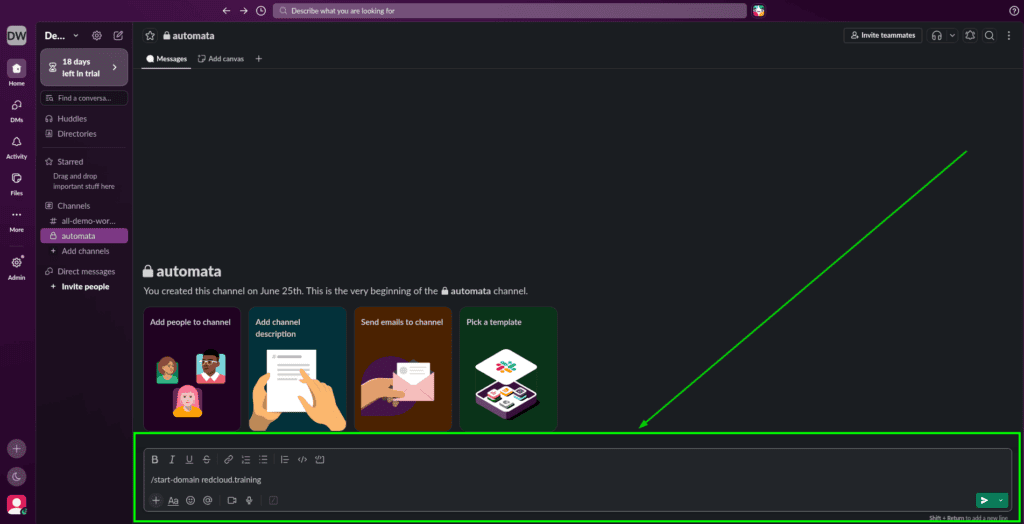
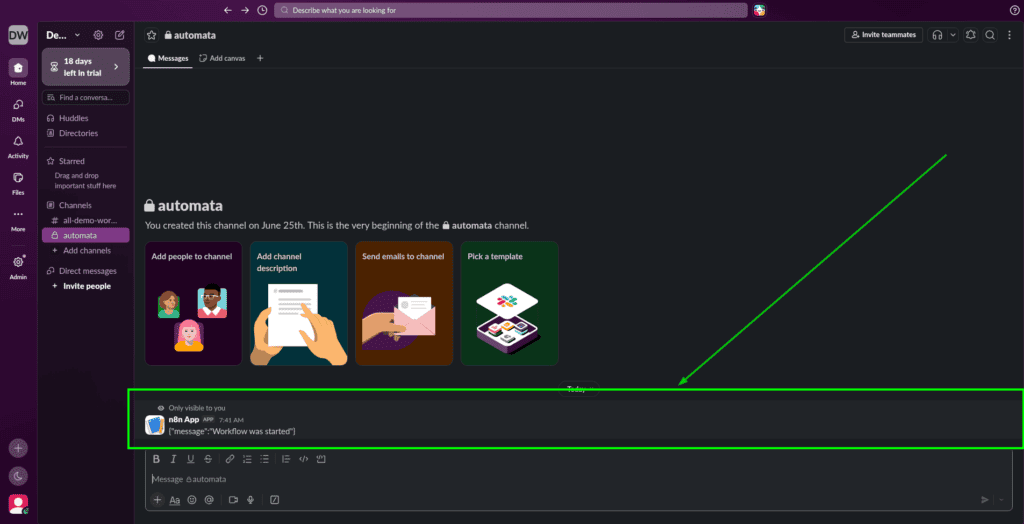
Send /recon-domain example.com to the Slack channel configured in the n8n node. The workflow will be executed in the n8n editor and the report will appear in Slack, similar to as shown in the images below.
Wrapping Up
n8n isn’t going to replace specialized recon tools to be honest. But as a glue layer which ties those tools’ APIs together, normalizes their output, and delivers results to operators in real time, it’s hard to beat. Nowadays, the barrier to running a recon is as low as typing a domain name in Slack and that changes how often people actually do it.