When Passwordless Falls Back: Offensive Techniques Against Passkeys
INTRODUCTION
A passkey is a cryptographic authentication credential that replaces passwords using public-key cryptography.
More concretely:
- A passkey consists of a public–private key pair
- The private key stays securely on the user’s device
- The public key is stored by the service (relying party’s web server)
- Private key is unlocked by the device credentials (Biometrics, PIN, Password, etc)
- Authentication is based on proof of possession, not knowledge
HOW PASSKEYS WORK?
Passkeys operate on top of WebAuthn + FIDO2, using a challenge–response model with asymmetric cryptography.
The below image illustrates the passkey architecture.
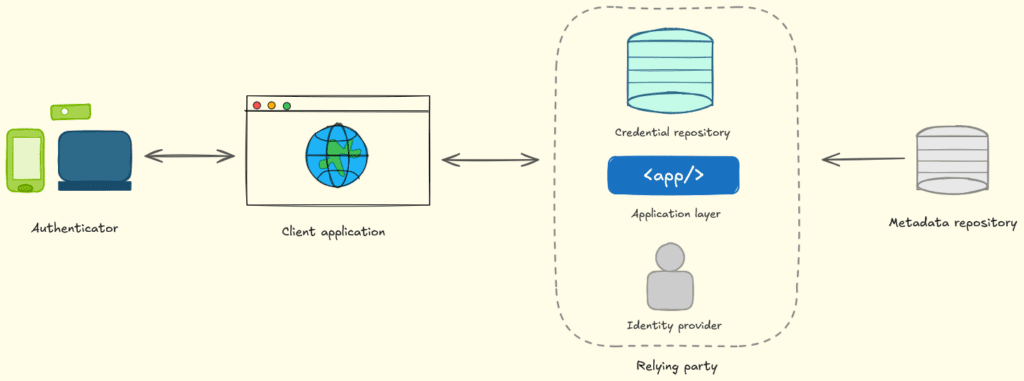
From the above image, it becomes clear that there are multiple components in play. First, we have the Authenticator, which is any modern device supporting the passkeys.
Then we have the client application where the user is trying to authenticate. This could be any WebApp that supports the WebAuthN protocol.
Next, we have the relaying party, which provides the authentication functionality to the client application.
Now, before we go any further, we need to understand the traditional phishing flow and why passkeys were created in the first place.
The image below shows how traditional phishing works using the Adversary-in-The-Middle (AiTM) attack flow.
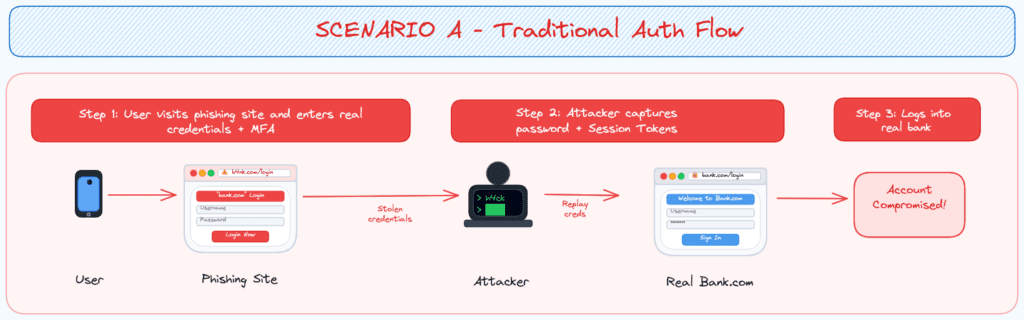
From the above image, we can see that when the user authenticated with the phishing site, all the credentials were relayed to the official website as well as stored on the attacker side. The weak point here is that the official website is accepting the relayed information because it’s operating on the trust that only the real user has the Username + Password + MFA.
So, based upon the above hypothesis, we can conclude that this authentication system doesn’t have much capability at present to verify whether the real user is authenticating or an attacker is spoofing the real user.
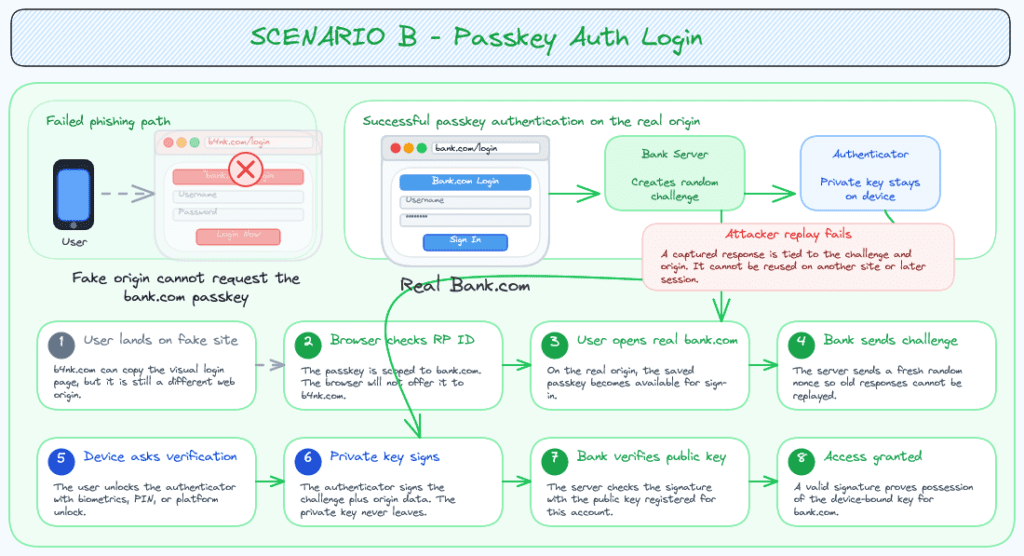
To solve this problem, the concept of passkeys was created. Passkey’s flow follows the trust of the certificate which is only available on the concerned device. Even if the attacker managed to perform AiTM and obtains the credentials, they cannot obtain the passkey as it will only be shared with the real domain and not with the fake one created by the attacker no matter the similarity/likeness.
The image below illustrates the flow of the passkey in action.
PASSKEYS IN MICROSOFT ECOSYSTEM
For the MFA, Microsoft has implemented their own solution named Microsoft Authenticator. Recently for specific devices, it also offers passkeys as a hardened passwordless authentication solution along with device bound keys in latest versions of Android 14+ / Windows 10+.
However, not all devices & browsers are supported yet and Microsoft has specific requirements for signing into their portals using different devices as shown below.
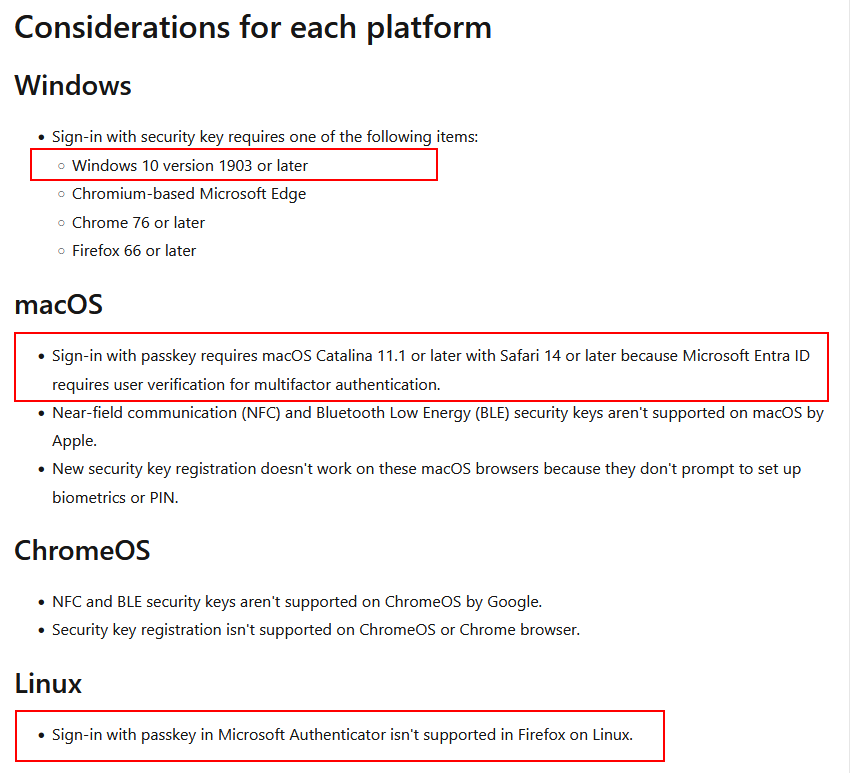
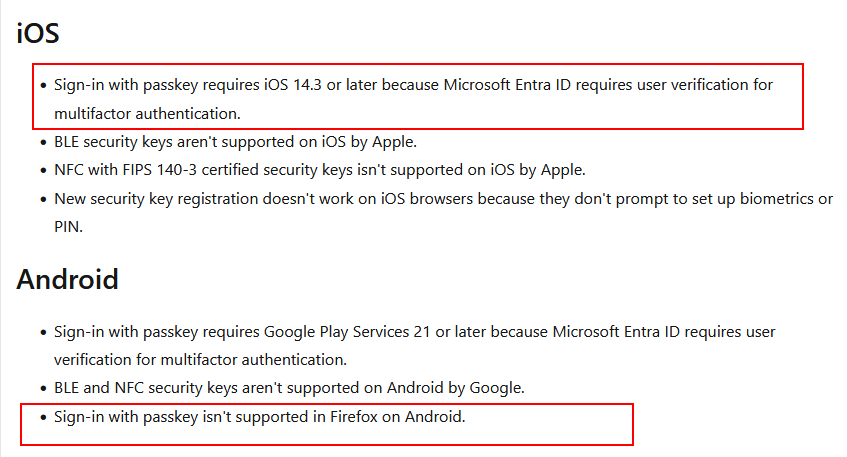
Based on the above specifications, we can determine that if the login request comes from certain combinations of OS + Browser, the passkey won’t work due to not being supported (yet).
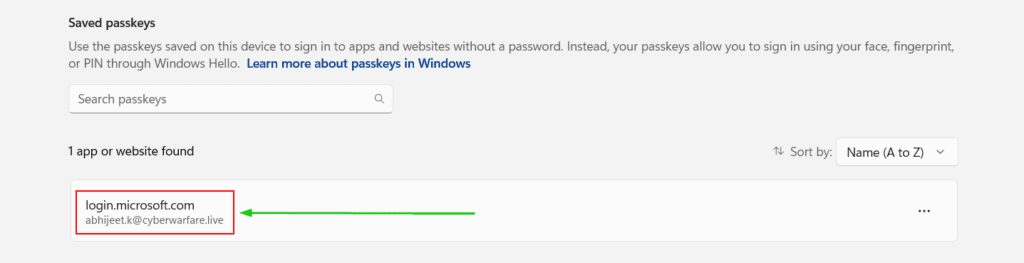
Now, coming to device-bound passkeys on Windows OS, the image below is an example of the passkey stored on my device for Microsoft Entra ID.
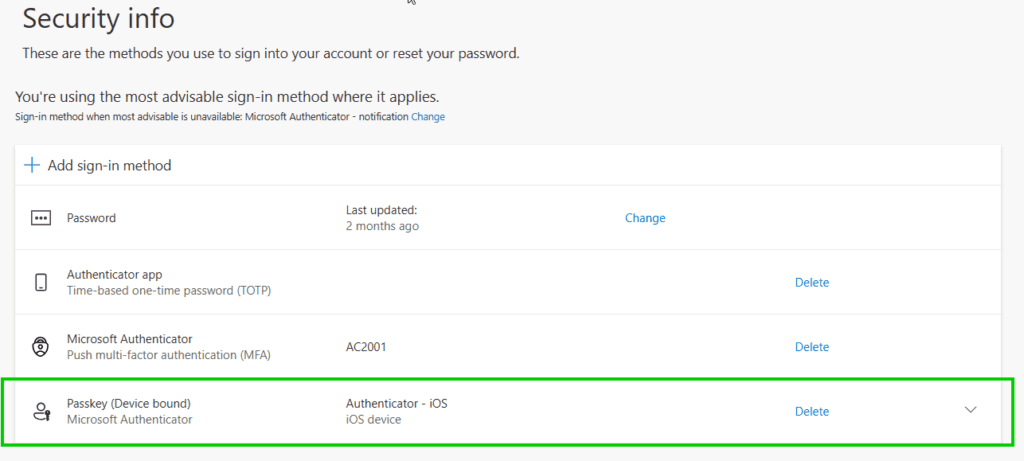
Another example of a Passkey stored in Microsoft Authenticator is shown below.
In the worst-case scenario, where I’m tricked into visiting a fake Microsoft login portal and enter my login credentials, for the MFA part, the request will fail as my browser will determine that the portal is not the original location for which this specific passkey was created and thus reject the further steps.
All sounds good, right?
Well, not really tho. This is only under the scenario where the device is supported by Microsoft’s standards for the passkey. What if the attacker somehow spoofs an unsupported browser or rewrites the request to remove the passkey options completely, forcing the MFA flow to backup methods like TOTP/SMS.
Early this year, a researcher named Carlos Gomez from IOActive, released a research titled Authentication Downgrade Attacks: Deep Dive into MFA Bypass. This research focuses on the later part of the attack i.e., rewriting certain request parameters.
His research focused on how Microsoft’s login flow works in tandem with the passkeys. Essentially, it comes down to the specific signals sent by the browser along with the login requests.
One such request is when the user enters their email address and hits enter. Request goes to endpoint https://login.microsoftonline.com/common/GetCredentialType?mkt=en-US and contains a keypair named “isFidoSupported”:true, by which the browser confirms supporting passkeys.
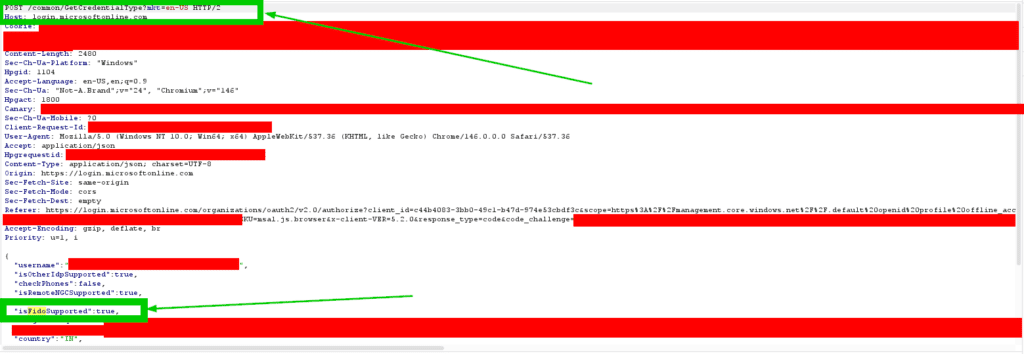
The response for this request also contains the FIDO parameters as shown in image below.
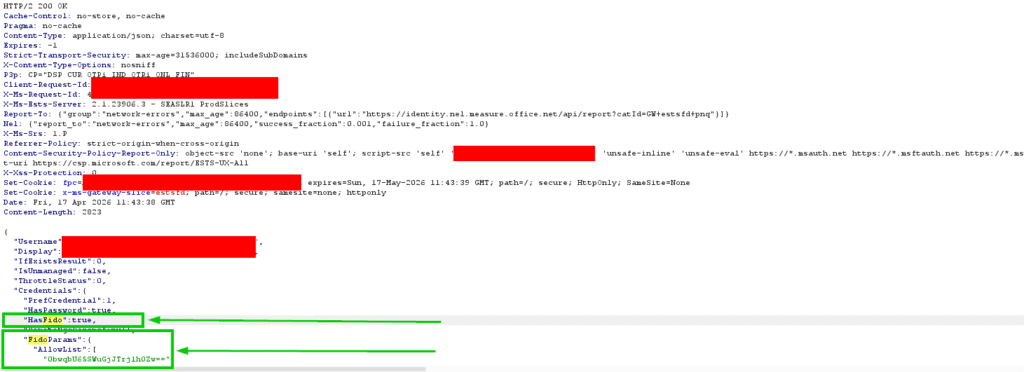
Similarly, the other requests & responses also contain the mention of the FIDO. Without any manipulation, the login flow will continue and then provide the user option to use passkey for authentication as shown in below images.
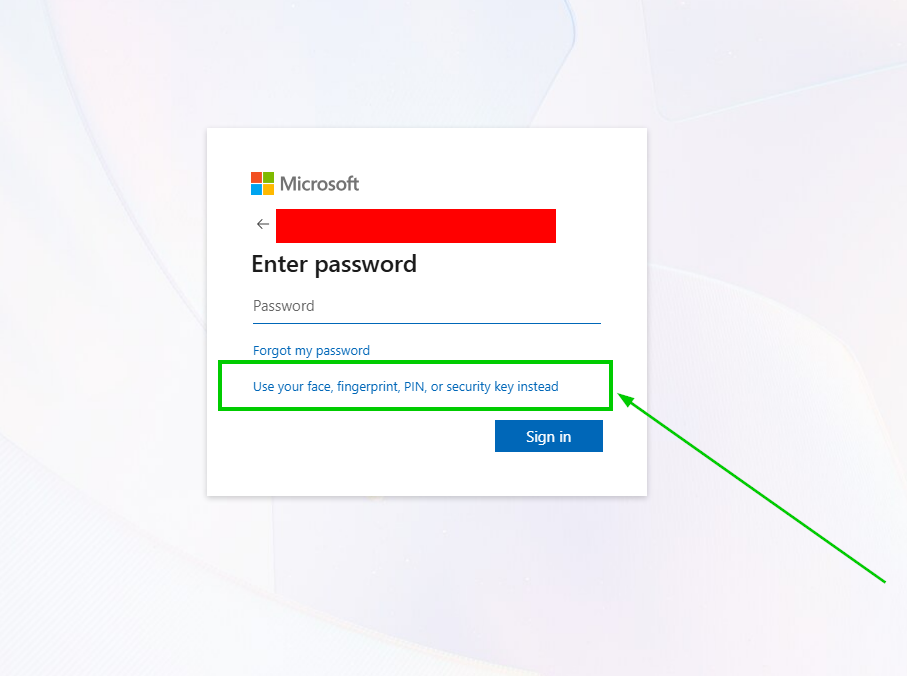
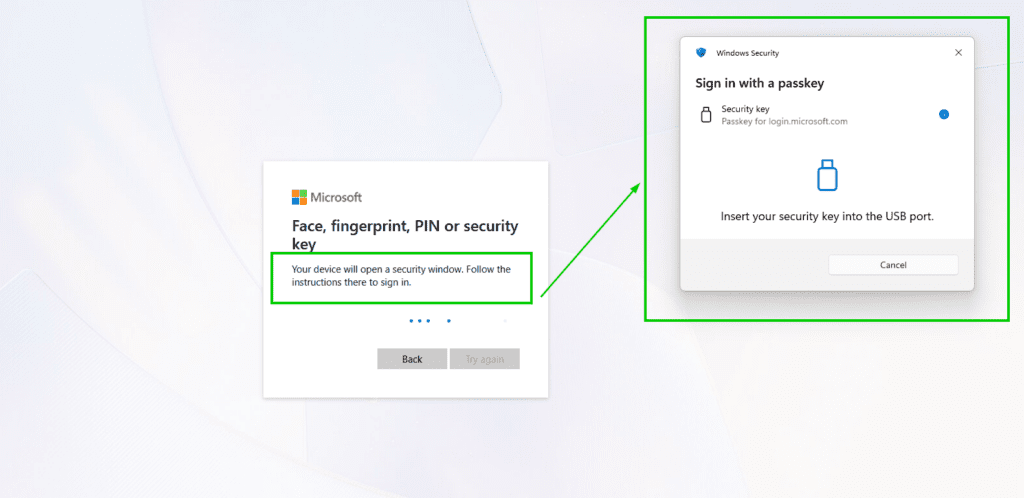
Now coming to manipulation, Carlos’s research focused on two techniques, first of which is JSON Configuration Manipulation and second is CSS Injection. Additionally, he also mentioned the idea of using Cloudflare Workers to host the Phishing Page and then perform rewriting of components there.
Experimenting with this, we created the infra and the Workers code to perform the techniques he mentioned as well as added a couple of others too. The full code is available HERE.
Now for a demo, let’s see the attack in action.
[DEMO]: When Passwordless Falls Back: Offensive Techniques Against Passkey
ENDING NOTE
This is worth noting that the aforementioned downgrade attack only work in the environments where fallback methods are configured. In case the FIDO/passkeys are strictly enforced, the attacks will fail to work.