Weaponizing Legitimate Flows: OAuth Token Abuse and Device Join Exploitation in Microsoft Entra ID - Part 1
Modern enterprise identity platforms like Microsoft Entra ID rely on token-based authentication and device trust to manage access securely. Instead of constantly asking for passwords, they use digital tokens to verify users and check whether the device being used is trusted. This helps create a smooth experience while still maintaining strong security.
However, these same features can introduce risks if not configured carefully. Since the system depends on legitimate authentication flows, attackers may try to take advantage of them rather than break through defenses directly. In many cases, the issue isn’t a flaw in the technology itself, but how it is set up or used.
This article takes a simple, step-by-step approach. It starts with the basics of authentication tokens, then explains the idea of Family of Client IDs (FOCI), and finally walks through a realistic attack scenario involving device enrollment and Primary Refresh Token (PRT) abuse. The goal is to make these concepts easier to understand while showing how small gaps can lead to bigger security concerns.
1. Token Fundamentals in Entra ID
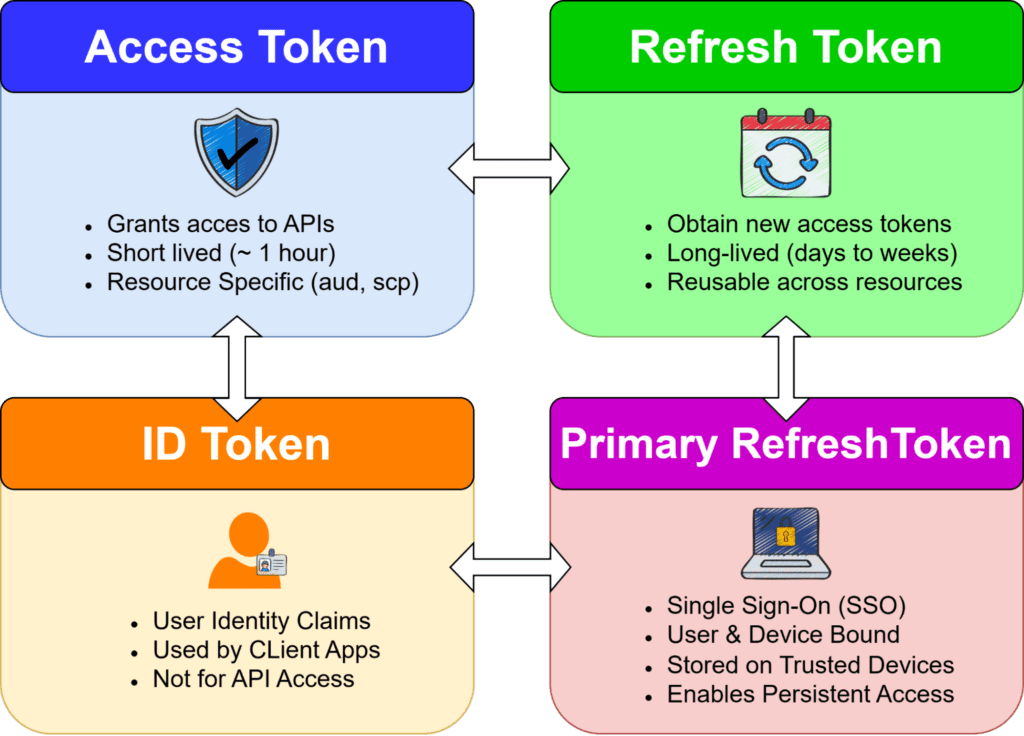
Microsoft Entra ID uses OAuth 2.0 and OpenID Connect to issue different types of tokens. Each token serves a specific role in authentication and authorization.
1.1 Access Token (AT)
- Audience: A defined service (e.g., Microsoft Graph, Intune).
- Key Properties:
- Contains claims like aud, scp, roles
- Cannot be reused across different resources
Claims of interest (Example)
					{
  "aud": "https://graph.microsoft.com",
  "scp": "User.Read Mail.Read",
  "roles": [],
  "tid": "<tenant_id>",
  "oid": "<object_id>",
  "xms_mirid": "...",
  "xms_cc": "CP1"
}
1.2 Refresh Token (RT)
- Key Properties
- Bound to a client and user
- Security Risk
A stolen refresh token is significantly more dangerous than an access token because:
- It enables persistent access
- It bypasses repeated MFA prompts in many scenarios
Key Behaviours
- Used at /token endpoint:
					POST /oauth2/v2.0/token
grant_type=refresh_token
- Can request tokens for different resources
1.3 ID Token
- Purpose: Represents the authenticated user (identity assertion)
- Used by: Client applications
- Key Properties
- Contains user identity claims (upn, oid, etc.)
- Not used for API access
1.4 Primary Refresh Token (PRT)
The Primary Refresh Token (PRT) is the most powerful token in Entra ID.
Key Properties
- Bound to:
- User identity
- Device identity (via certificate/private key)
- Stored securely on the device
- Used silently to obtain access tokens
- Bound to:
Security Impact
Compromise of a PRT effectively means:- Full session takeover
- MFA bypass in many scenarios
- Persistent access tied to a “trusted device”
Decoded PRT token
					{
  "alg": "RS256",
  "kid": "<key_id>",
  "typ": "JWT",
  "x5t": "<certificate_thumbprint>",
  "nonce": "<nonce_value>"
}
{
  "aud": "<resource_url>",
  "iss": "https://sts.windows.net/<tenant_id>/",
  "tid": "<tenant_id>",
  "oid": "<user_object_id>",
  "sub": "<subject_identifier>",
  "idtyp": "user",
  "appid": "<client_id>",
  "app_displayname": "<application_name>",
  "scp": "<space_separated_scopes>",
  "roles": [],
  "amr": ["pwd", "mfa"],
  "acr": "<auth_context_class>",
  "acrs": ["<auth_context_ids>"],
  "deviceid": "<device_id>",
  "platf": "<platform_type>",
  "iat": <issued_at>,
  "nbf": <not_before>,
  "exp": <expiry>,
  "ipaddr": "<client_ip>",
  "name": "<user_display_name>",
  "upn": "<user_principal_name>",
  "unique_name": "<user_identifier>",
  "sid": "<session_id>",
  "puid": "<user_puid>",
  "wids": ["<directory_role_ids>"],
  "xms_*": "<microsoft_internal_claims>"
}
2. What is the need of PRT
At first glance, Refresh Tokens and Primary Refresh Tokens may seem similar—they both help users stay logged in without repeatedly entering credentials. But in practice, they operate at completely different levels, and this difference is what makes PRTs so powerful.
Think of it this way:
- A Refresh Token is tied to an application
- A Primary Refresh Token (PRT) is tied to the device itself
This shift, from application-level access to device-level trust.
Life Without PRT: Application-Centric Authentication
On a typical personal or unmanaged device, authentication is application-driven.
When a user accesses different services:
- Logging into Teams → generates a refresh token for Teams
- Opening OneDrive → triggers a separate authentication flow
- Accessing Outlook → yet another login context
					POST https://login.microsoftonline.com/{tenant}/oauth2/v2.0/token
Content-Type: application/x-www-form-urlencoded

grant_type=refresh_token
client_id=<App_ClientID>
refresh_token=<RT>
scope=https://graph.microsoft.com/.default
In this, required new refresh tokens for different Client Apps
Each application maintains its own session and token lifecycle.
- The experience is functional, but fragmented
- Each service independently verifies trust
Life With PRT: Device Becomes the Identity Anchor
On a corporate, Azure AD-joined device, the model changes completely.
- The user logs into the device once
- A Primary Refresh Token (PRT) is issued and securely bound to that device
From that point onward:
- Opening Teams → silently authenticated
- Accessing OneDrive → no new login
- Visiting Azure Portal → seamless access
					POST https://login.microsoftonline.com/{tenant}/oauth2/v2.0/token
Content-Type: application/x-www-form-urlencoded

grant_type=refresh_token
client_id=<App_ClientID>
refresh_token=<PRT>
scope=https://graph.microsoft.com/.default
In this, the same PRT will work for different Client Apps.
The device itself is now trusted. Authentication becomes centralized and invisible to the user.
3. Family of Client IDs (FOCI)
3.1 What is FOCI?
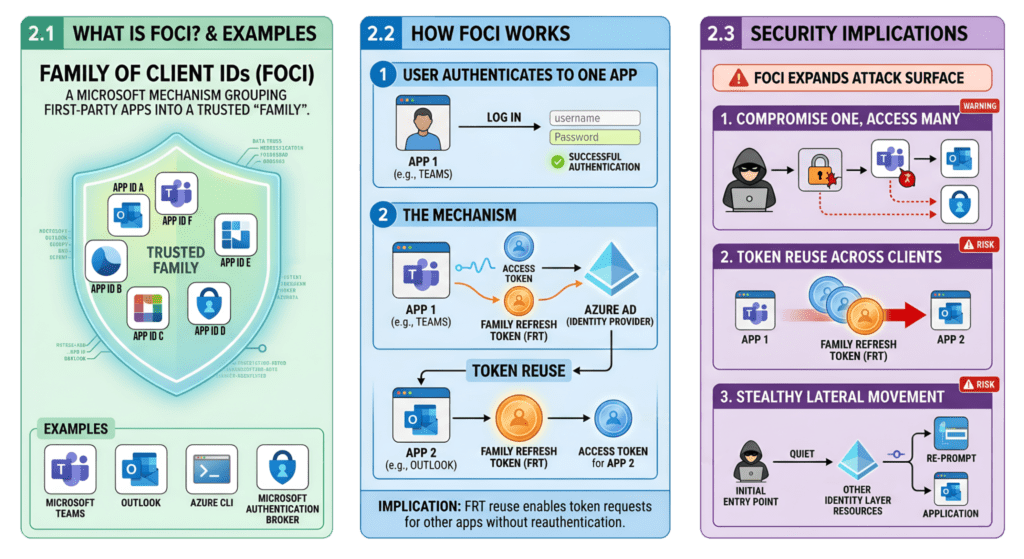
FOCI is an acronym for “Family of Client IDs”.
FOCI is a Microsoft mechanism that groups multiple first-party applications into a trusted “family.”
Examples of FOCI-enabled apps
- Microsoft Teams
- Outlook
- Azure CLI
- Microsoft Authentication Broker
What are Family Refresh Tokens (FRT) ?
Family refresh tokens are a unique type of refresh token that bypass the token-binding protections outlined in the OAuth 2.0 specifications.
FOCI introduces token portability across trusted Microsoft clients.
Instead of:
RT → single client_id
We get:
FRT → multiple client_ids (family-bound)
3.2 How FOCI Works
When a user authenticates to one FOCI-enabled app:
- A Family Refresh Token (FRT) is issued
- This token can be reused by other apps in the same family
Family refresh tokens can expand access beyond what a single app was originally granted. However, they don’t give users more rights than they already have in Azure AD, but they do allow broader access across multiple apps than what was initially authorized for one app.
A second FOCI-enabled app can reuse the same FRT:
					POST /oauth2/v2.0/token
Content-Type: application/x-www-form-urlencoded

grant_type=refresh_token
refresh_token=<FRT>
client_id=<different FOCI app>
scope=https://graph.microsoft.com/.default
Implication
A refresh token obtained via one app can be used to request tokens for another app without reauthentication.
3.3 Security Implications of FOCI
FOCI significantly expands attack surface:
- Compromise of one app → access to multiple services
If an attacker gets a token from one app, they can use it to access other apps in the same family, spreading the breach across services.
- Token reuse across trusted Microsoft clients
These tokens work across multiple trusted apps, so attackers can reuse one token instead of breaking into each app separately.
- Enables stealthy lateral movement within identity layer
Attackers can move between apps using the same token without easily being detected, making it harder to spot and giving them extended access.
3.4 Well-Known FOCI
Here is a list of known FOCI “family” client applications:
Client ID | Application Name |
00b41c95-dab0-4487-9791-b9d2c32c80f2 | Office 365 Management |
04b07795-8ddb-461a-bbee-02f9e1bf7b46 | Microsoft Azure CLI |
1950a258-227b-4e31-a9cf-717495945fc2 | Microsoft Azure PowerShell |
1fec8e78-bce4-4aaf-ab1b-5451cc387264 | Microsoft Teams |
4813382a-8fa7-425e-ab75-3b753aab3abb | Microsoft Authenticator App |
d3590ed6-52b3-4102-aeff-aad2292ab01c | Microsoft Office |
9ba1a5c7-f17a-4de9-a1f1-6178c8d51223 | Microsoft Intune Company Portal |
d326c1ce-6cc6-4de2-bebc-4591e5e13ef0 | SharePoint |
b26aadf8-566f-4478-926f-589f601d9c74 | OneDrive |
cab96880-db5b-4e15-90a7-f3f1d62ffe39 | Microsoft Defender Platform |
29d9ed98-a469-4536-ade2-f981bc1d605e | Microsoft Authentication Broker |
Closing
At first glance, Microsoft Entra ID’s authentication model feels seamless—almost invisible. Tokens handle access quietly, devices act as trusted anchors, and applications interoperate through OAuth 2.0 and OpenID Connect with minimal friction. It’s an architecture designed to balance strong security with a smooth Single Sign-On experience.
Yet beneath this simplicity lies a powerful system.
Access Tokens provide scoped access (aud, scp), Refresh Tokens extend session continuity, and PRTs elevate trust by binding identity to a device using cryptographic mechanisms like proof-of-possession. With FOCI, this trust can extend across multiple Microsoft clients rather than staying limited to a single application.
Individually, these components are secure and standards-aligned. Together, they form a tightly connected trust fabric—where token reuse, persistent sessions, and cross-application access are inherent by design.
It’s not a bug—it’s a feature. (Famous last words in security.)
Understanding this interplay is essential, because the real risk emerges when these legitimate authentication flows are leveraged in unintended ways.