The Anatomy of a Beacon Object File: From COFF Compilation to In-Memory Execution
Introduction
In modern red team operations, stealth is not optional. EDR solutions heavily monitor traditional post-exploitation techniques that rely on dropping executables or DLLs to disk. File creation events, suspicious child processes, and recognizable tool signatures make disk-based execution risky.
Beacon Object Files (BOFs), popularized by Cobalt Strike, introduced a cleaner and more controlled approach: compile small C code into a COFF object file and execute it directly in memory through an existing beacon session.
This blog walks through the full technical lifecycle of a BOF from compilation to execution inside a running beacon.
Reference: GitHub
Why BOFs Exist
The problem is simple:
- Writing binaries to disk leaves forensic artifacts.
- Spawning new processes increases behavioral detection risk.
- PowerShell and script-based tradecraft are heavily monitored.
BOFs solve this by:
- Avoiding disk writes.
- Avoiding new process creation.
- Running inside the memory space of the existing beacon process.
Instead of executing a new program, you inject functionality into the current implant.
Reference: BOF
What Is COFF and Why It Matters
A BOF is not a full executable. It is just an object file compiled in COFF (Common Object File Format).
When you normally compile a C program into an .exe, the compiler first creates object files, and then the linker combines them with libraries to produce a complete executable that can run on its own.
With a BOF, you stop before linking.
You only generate the object file. That file contains the code section, data sections, symbol information and relocation entries. But it is not a complete program, so it cannot run by itself.
It is incomplete on purpose.
At runtime, the beacon loader handles the missing linking stage in memory. It resolves symbols, fixes addresses, and executes the code directly inside the existing process. That is why COFF matters. It allows execution without dropping a full executable to disk, making operations more controlled and stealthy.
Reference: Coffee
Demo: How to Execute a Custom BOF in Sliver C2
What is a BOF?
A Beacon Object File (BOF) is a compiled C program (.o file) that runs inside a C2 implant’s memory without spawning a new process. Originally from Cobalt Strike, Sliver supports them via coff-loader.
Step- 1 : Install the cross compiler on Kali
sudo apt install mingw-w64 -y
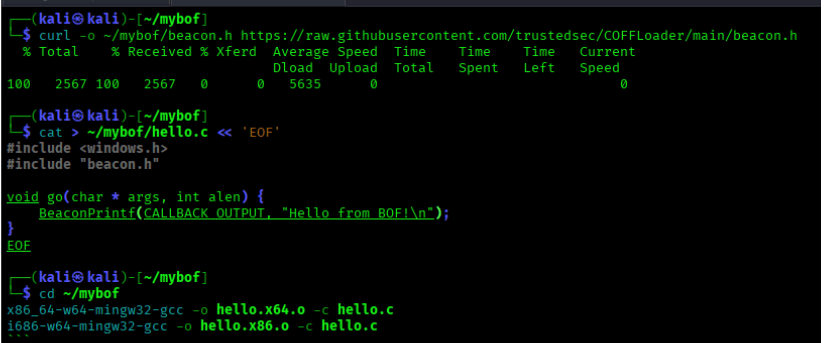
Step – 2 : Download the real Beacon API header
					mkdir ~/mybof
curl -o ~/mybof/beacon.h https://raw.githubusercontent.com/trustedsec/COFFLoader/main/beacon.h
This is critical, without the real beacon.h, BeaconPrintf won’t resolve correctly at runtime.
Step – 3 : Write your BOF in C
					cat > ~/mybof/hello.c << 'EOF'
#include <windows.h>
#include "beacon.h"

void go(char* args, int alen) {
    BeaconPrintf(CALLBACK_OUTPUT, "Hello from BOF!\n");
}
EOF
Step – 4 : Compile for both x64 and x86
					x86_64-w64-mingw32-gcc -o ~/mybof/hello.x64.o -c ~/mybof/hello.c
i686-w64-mingw32-gcc -o ~/mybof/hello.x86.o -c ~/mybof/hello.c
Both architectures are required Sliver will fail if either is missing.
Step – 5 : Create extension.json
					cat > ~/mybof/extension.json << 'EOF'
{
  "name": "mybof",
  "version": "1.0.0",
  "command_name": "mybof",
  "extension_author": "you",
  "original_author": "you",
  "repo_url": "",
  "help": "Hello world BOF",
  "long_help": "",
  "depends_on": "coff-loader",
  "entrypoint": "go",
  "files": [
    {
      "os": "windows",
      "arch": "amd64",
      "path": "hello.x64.o"
    },
    {
      "os": "windows",
      "arch": "386",
      "path": "hello.x86.o"
    }
  ],
  "arguments": []
  }
EOF
Step – 6 : Install coff-loader in Sliver
armory install coff-loader
Step – 7 : Load your extension
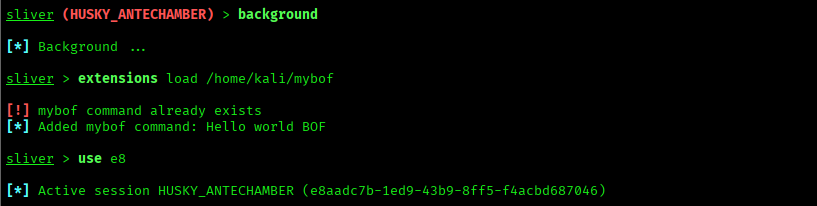
Step – 8 : Run it in your session

Reference: Coff-Loader
Detection & Defensive Perspective
Even though BOFs avoid dropping executables, they are not invisible. In-memory execution reduces artifacts, but it does not eliminate detection.
Defenders can look for:
- Suspicious memory allocations
- RWX memory regions
- Unusual API call patterns
- Behavioral anomalies inside legitimate processes
Reference: Wazuh
Conclusion
BOFs are not magic. They are just a smarter way to get things done without making noise.
Instead of dropping a file to disk or spawning a new process, a BOF quietly runs inside your already existing implant. Less noise means less chance of getting caught.
Building one from scratch taught us something important: the details matter. The wrong header file, a missing architecture, or a small JSON mistake will silently break everything. Once we got those right, it just worked.
If you are getting into red teaming, understanding BOFs at this level is worth the effort. Not just to run them, but to understand what is actually happening inside the process when your code executes in memory.
Stealth is not about being invisible. It is about being quiet enough not to be noticed.